





General-purpose agents often rely on tools served by Model Context Protocol (MCP) servers to accomplish things for humans. MCP has quickly become the go-to protocol for enabling AI agents to access a wide range of tools. At a high level, a large language model (LLM) acts as the agent’s “brain,” while tools give it the ability to take real-world actions. So in essence, by leveraging MCP servers, agents can seamlessly combine reasoning from LLMs with action through tools. For instance, if you ask an agent to schedule your next car service appointment 90 days after the last one, it would use a search-events tool to find the date of your last service, a make-car-service-appointment tool to make the appointment with your mechanic shop, and a create-event tool to create a new calendar entry to remind you of your appointment.
The Model Context Protocol (MCP) standardizes how agents connect with external services through three core primitives that a server can expose:
- Tools – Executable functions that agents can call to perform actions (e.g., API calls, file operations, database queries)
- Resources – Data sources that provide contextual information (e.g., file contents, database records, API responses)
- Prompts – Reusable templates that structure interactions with language models (e.g., system prompts, few-shot examples)
As MCP adoption grows, so does the number of publicly available MCP servers, each exposing unique tools that agents can use to accomplish complex, multi-step tasks.
How agents call remote MCP server tools?
In agent frameworks, each tool typically consists of three components: a name, a description, and a structured input schema or parameters. This concept is consistent across most agent SDKs such as Vercel AI SDK, Google ADK, Autogen, CrewAI etc.
Similarly, MCP servers expose tools that agents can use remotely. To enable seamless integration, agent SDKs provide MCP connector utilities that automatically translate or wrap MCP-exposed tools into native Agent SDK tool definitions. This translation occurs on a one-to-one basis, meaning each tool exposed by the MCP server is represented as an equivalent SDK tool within the agent’s environment.
When an agent invokes one of these translated tools during execution, the SDK handles the underlying network communication – sending the request to the appropriate remote MCP server, executing the target tool there, and returning the resulting output back to the agent. This allows the agent to interact with external systems as if those remote tools were local.
Examples of MCP connector utilities include:
- experimental_createMCPClient in Vercel AI SDK
- autogen_ext.tools.mcp in Autogen
- MCPToolset in Google ADK
- MCPServerAdapter in CrewAI
How Dynamic MCP Server Discovery can be helpful?
Connecting an agent to every available MCP server upfront is detrimental to their performance in a number of ways. It is neither a scalable nor an efficient approach. This is because of a very human problem that we find that agents also suffer from – Information Overload.
The number of tools significantly impacts an agent’s token usage, as each tool’s name, description and arguments are added to the prompt for the LLM to process. This means, more tools lead to a larger context window filled with tool information, increasing token consumption with every call.
Also, when an agent is forced to sift through a multitude of services, it increases the chances of the agent selecting the wrong services and tools, or requiring the human to provide very fine-tuned contextual instructions to tie-break.
We believe that an agent needs contextual discovery – the ability for an agent to identify and install only the most relevant MCP servers at runtime, based on its current task or environment. This approach ensures leaner execution, improved relevance, and greater adaptability, empowering agents to operate more intelligently and efficiently in real-time.
Enter: A Directory of Services
How does a clueless teenager find the right stores in a sprawling shopping mall? With a directory.
How does a clueless agent find the right MCP servers or APIs across the vast internet? With a directory.
Directories function as discovery and decision-making layers that allow agents to locate, evaluate, and connect to the most relevant services without hardcoded integrations. In this context, a directory acts as a centralized, searchable registry that aggregates information about available services – such as MCP servers or OpenAPI specifications.
Broadly, directories serve two essential purposes. First, they help agents determine which services to use by exposing rich descriptive metadata – including a service’s name, overview, capabilities, prerequisites, pricing, licensing terms, website and compliance details. This enables agents to assess whether a service fits their operational context or policy constraints.
Second, directories provide the practical details needed for how to connect and interact with those services. This includes endpoint URLs and links to documentation or integration guides that outline common usage patterns. With this information, agents can initiate and manage service interactions autonomously and efficiently.
Rather than depending on static or preconfigured integrations, agents can dynamically query one or more directories at runtime to find and connect with services that match their current goals or user intent. For MCP servers, a directory typically returns the server’s URL, allowing the agent to establish a connection and access the tools it exposes. For OpenAPI specifications, the directory provides the corresponding spec URL – which the agent can then parse and transform into executable tools. To dive deeper into how agents interpret and utilize OpenAPI specs, please see our blog titled Converting OpenAPI Specs to Agent Tools.
While the concept of directories is not new, their importance continues to grow. Frameworks such as A2A and AGNTCY also leverage directory-based architectures within their respective ecosystems. As the ecosystem matures, a diverse network of directories will coexist – collectively fostering a more open, connected, and extensible agent-driven internet.
Real world use-case:
Let’s say you are a financial analyst who needs to analyse and create a presentation for pickup truck sales data in 2024 in the United States, but you don’t know where to acquire this particular dataset.
You may prompt your agent something like –
“Find a dataset for pickup truck sales in the United States for the year 2024”
Assuming the agent has access to a directory, it will discover, connect and use tools from a service that actually sells this premium data. This means that now the financial analyst doesn’t need to manually find, purchase and set up each service that they may, or may not use, up-front. With this approach, the burden shifts from human-driven static integration to agent-driven dynamic orchestration. The result is lighter development, greater flexibility, and agents that can truly adapt to whatever the user needs next.
The Challenge: Agents Can’t Change their Toolsets Mid-Run
Today, most agent frameworks assume a fixed setup: an agent is initialized with a pre-defined set of tools (often MCP-based tools), and that toolset stays static throughout its lifetime. The concept of dynamic discovery – where an agent identifies a new MCP server during runtime and immediately connects to it – isn’t fully supported yet.
In other words, an agent can find an MCP server / OpenAPI spec, but it can’t connect to it and use it right away. The missing link is the ability to load and register new tools during agent runtime.
As MCP adoption grows and agent frameworks evolve, this gap will likely close. But for now, we need a creative and practical workaround – re-triggering the agent when a new toolset is needed.
The Dynamic Discovery Flow
Coming back to the financial analyst agent example above – the analyst doesn’t know where to find the necessary sales data. However, the agent is pre-loaded with one or more directories – in our example, it is Skyfire’s directory. The agent is also set up with a fundamental ability to set up / install new MCP servers which is achieved by the agent being able to re-trigger itself. Re-triggering terminates the active agent session and restarts the agent with a new toolset.
Here’s the high-level agentic flow
- The financial analyst prompts the agent with their task “Find a dataset for pickup truck sales in the United States for the year 2024”
- The agent invokes its LLM to interpret the analyst’s request
- The agent queries the directory to find a relevant service
- In our example, the agent happens to use the find-seller tool from Skyfire’s Identity & Payment MCP Server.
- The directory returns a list of matching services which in our example are MCP servers
- The agent selects the most appropriate one for the analyst’s request
- The agent installs and connects to the selected MCP server by first adding the new MCP server to its list of connected MCP servers, and then re-triggering itself
- The MCP server tools converted to agent-understandable tools are now available in the agent’s runtime environment
Now, let’s take a closer look at how the agent executes this process – specifically, how it re-triggers itself to leverage the toolset provided by a dynamically discovered MCP server.
1. Registering MCP servers
At startup, the agent loads a default context with two lists. The available_mcp_servers list statically defines known MCP servers – such as the Skyfire Identity & Payment MCP server – and can be expanded with additional pre-configured servers as required.
As the agent executes, it may encounter additional MCP server URLs from directories or contextual data. These newly discovered servers are then registered under the dynamically_mounted_server list.
{
  available_mcp_servers: [
    {
      url: process.env.SKYFIRE_MCP_URL || "",
      headers: {
        "skyfire-api-key": apiKey,
      },
    },
  ],
  dynamically_mounted_server: [],
};
In the following sections, we’ll explore how the agent extracts MCP server URLs from the large volume of information it processes during runtime.
2. Querying the Directory
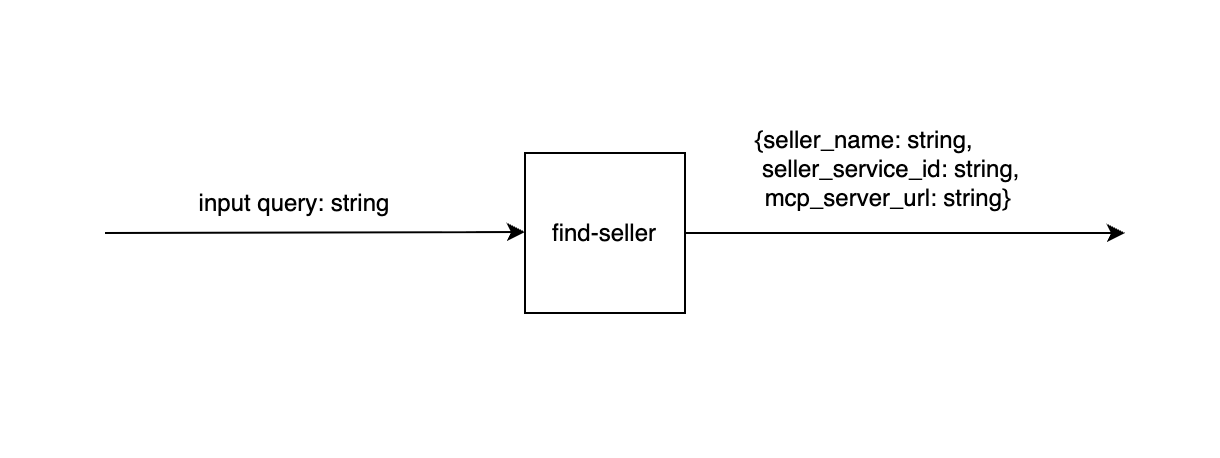
The find-seller tool, provided by the Skyfire Identity & Payment MCP Server, functions as Skyfire’s directory search utility. When the analyst issues a prompt, the agent’s LLM extracts relevant keywords and invokes the find-seller tool to perform the lookup. Using the input query, the tool searches Skyfire’s directory of seller services and returns a matching seller’s details – including its MCP server URL or OpenAPI specification URL, along with key metadata such as seller_name and seller_service_id.
3. Dynamic Toolset Addition via Agent Re-trigger
When a new MCP server is discovered at runtime, the agent invokes a static placeholder tool called connectMcpServerTool to simulate the connection process. This tool takes a single parameter – the MCP server URL – and serves as an indicator that the agent intends to connect to that server. Since agents cannot establish MCP connections directly during execution, the tool simply returns a static response such as:
“Connecting to MCP server from …”
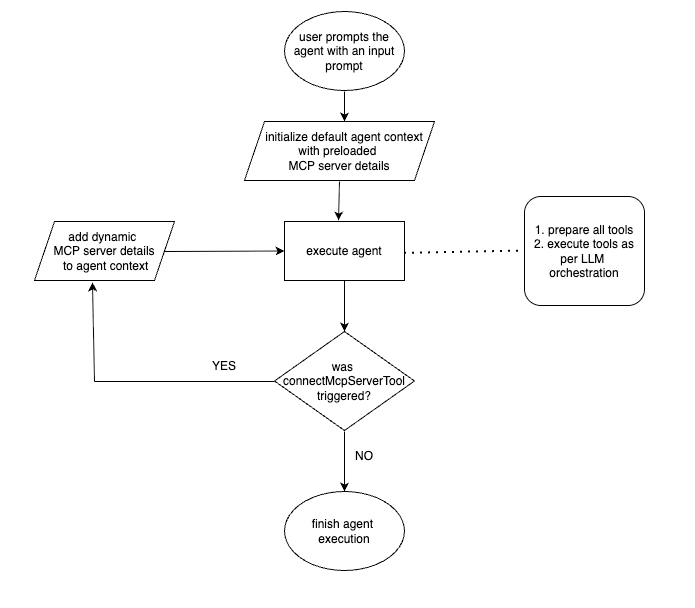
After the agent finishes its execution cycle, a custom re-trigger logic component takes over. This logic has access to all executed tools, their parameters, and responses. It checks whether connectMcpServerTool was invoked and, if so, adds the newly discovered MCP server URL to the dynamically_mounted_server list in the agent’s context. The agent is then re-triggered, allowing the next execution to automatically recognize and use the tools exposed by the newly registered MCP server.
tool ({
    description: "Connects to the MCP server URL",
    inputSchema: z.object({
mcpServerUrl: z.string().describe("URL for MCP server"),
    }),
    execute: async ({ mcpServerUrl}: { mcpServerUrl: string }) => {
      return {
        content: [
          {
            type: "text",
            text: `Connecting to MCP server from ${mcpServerUrl}`,
          },
        ],
       };
     };
)};
The flow diagram illustrates the retrigger logic on connectMcpServerTool execution:
Recap of the overall flow:
- When the analyst provides an input prompt, the agent is initialized with a default context that includes pre-configured details for essential MCP servers, such as the Skyfire Identity & Payment server.
- Agent execution starts by converting available MCP server tools into agent-understandable tools via its MCP connector libraries. It then executes tasks using LLM-driven tool orchestration, leveraging these tools as needed.
- During execution, the agent parses any discovered MCP server URL from the tool-call response and triggers the static tool connectMcpServerTool. After execution, retrigger logic checks
- If connectMcpServerTool is invoked, it adds the new MCP server URL to the agent context, and re-triggers the agent, allowing access to tools from the newly discovered server.
- If no new MCP servers are discovered during the run, the agent completes its execution.
Open-sourced implementation:
Please find our open-sourced implementation to dynamically discover and trigger tools available from Dappier to get pickup truck sales data for the year 2024 based on the above approach here. You can also try it out here.
Benefits of This Approach
- Context-Aware Tooling:
- With dynamic discovery, agents no longer need to preload hundreds of irrelevant tools. Instead, they install and connect only to the MCP servers or OpenAPI specs that are contextually relevant to the user’s current request.
- This ensures that the agent’s reasoning space stays clean and focused – minimizing tool-selection ambiguity for the LLM and improving decision quality.
- Improved Performance:
- By limiting the number of active tools and connections, the agent’s token usage and orchestration complexity decrease. This leads to:
- Faster tool selection and execution
- Lower latency in reasoning and planning
- Reduced data parsing overhead
- In practice, this means that even as the number of public MCP servers scales, each agent session remains lightweight and performant – focused only on what’s necessary for that specific task.
- By limiting the number of active tools and connections, the agent’s token usage and orchestration complexity decrease. This leads to:
- Step towards general purpose agents:
- Directory driven architecture decouples the agent from individual services. The agent only needs to know where to look, not every service in advance. Anyone can add, update, or remove MCP servers in the directory without modifying the agent’s core logic, making it a truly general-purpose agent.
What’s Next?
Frameworks like AWS Strands have already enabled hot-reloading of MCP services. They have added a mcp_client tool that allows the client to connect to different MCP servers while the agent continues running. Hopefully soon, future versions of many other agentic frameworks won’t require a re-trigger, this will make the system even more reactive and seamless.
Until then, the agents built on Vercel AI SDK and Autogen employ the retrigger-and-reload approach that offers a practical middle ground – enabling dynamic capability upgrades during an agent’s run. By combining a Directory of Services with a smart discovery and re-trigger pattern, the agent is equipped to grow its capabilities on the fly – just in time, not all the time.
Feel free to look at the reference implementations for a Financial Analyst Agent built on various agent platforms here.